.png)

Sourcing Workspace
- Print
- DarkLight
- PDF
Sourcing Workspace
- Print
- DarkLight
- PDF
Article summary
Did you find this summary helpful?
Thank you for your feedback!
Overview of the LightBox Live Platform
LightBox Live is an integrated commercial real estate (CRE) intelligence platform designed to help professionals analyze, source, and track property opportunities in one central environment. It combines property-level data, market insights, and mapping tools into a single, streamlined interface.
LightBox Live is organized into workspaces, each focused on a distinct aspect of the investment and research workflow. Workspaces provide users with dedicated tools and data relevant to a specific stage of their CRE process.
Currently, LightBox Live includes the following workspace:
Sourcing – Enables users to identify, evaluate, and track investment opportunities for both for-sale and off-market properties.
This documentation focuses exclusively on the Sourcing Workspace, which is purpose-built to support the research, comparison, and ongoing monitoring of CRE opportunities. Within the Sourcing workspace, users can:
Search for and filter active listings and off-market properties using advanced search and map tools.
Explore detailed property data, including location, broker information, transaction details, and ownership records.
Save listings to personalized lists for follow-up and portfolio tracking.
Use mapping, drawing, and measurement tools to refine search areas and visualize opportunities spatially.
The Sourcing workspace is designed for speed, precision, and data transparency, helping users move seamlessly from discovery to decision-making.
Sourcing Overview
The Sourcing Workspace is divided into three main sections designed to work together seamlessly: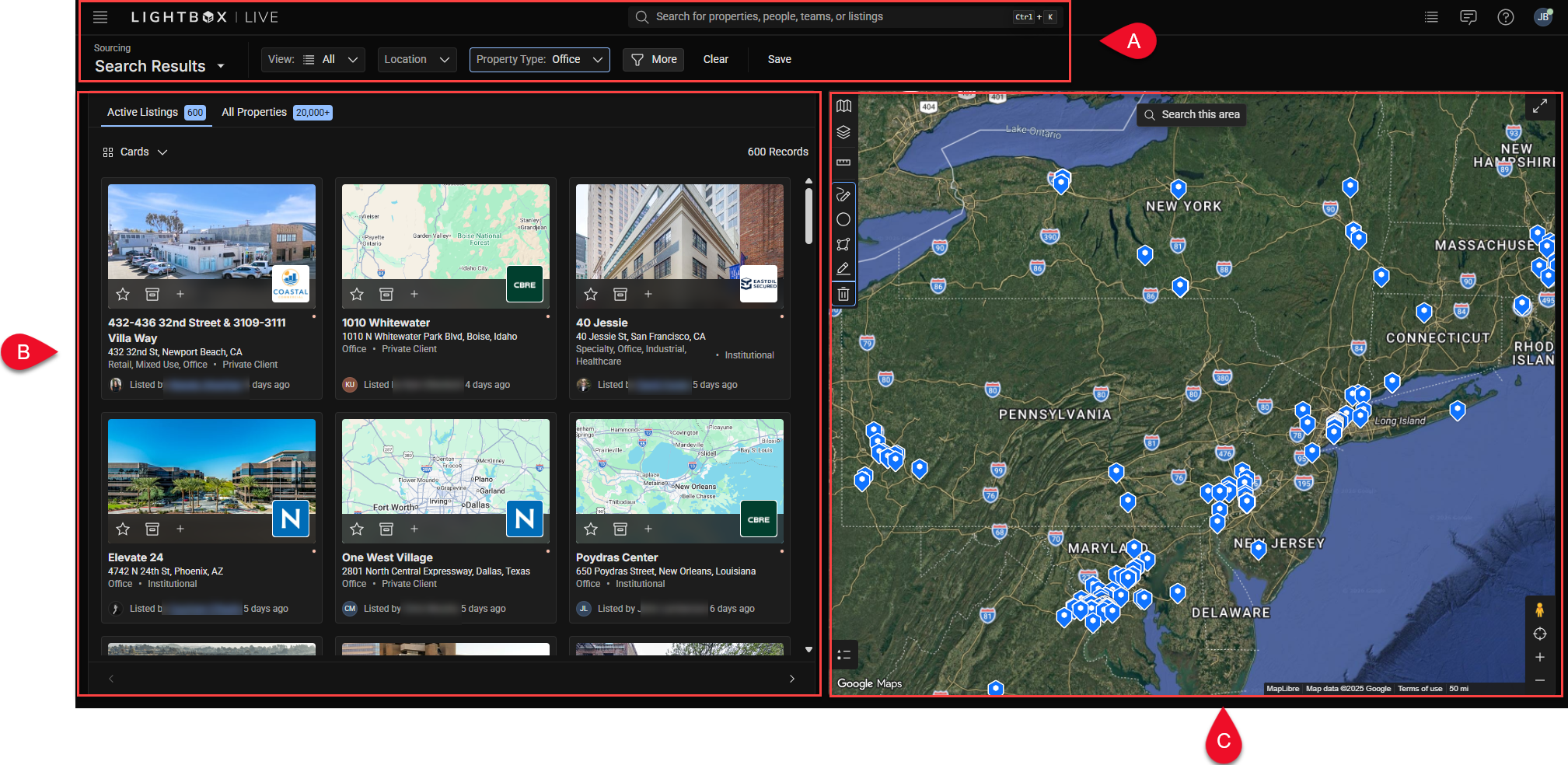
A. Search and Filter Bar – Located at the top of the page, this toolbar allows users to search by keyword, location, and property characteristics.
B. Sourcing Panel – Found on the left side of the screen, this panel displays property results as either cards or a sortable table.
C. Interactive Map – Occupies the right side of the interface, showing property locations, drawn boundaries, and parcel data.
Each area updates dynamically as you adjust filters or move the map. For example, refining your filters will immediately update both the Sourcing Panel and the Map to show only relevant results.
Next Steps
Was this article helpful?
.png)