.png)

City Directories
- Print
- DarkLight
- PDF
City Directories
- Print
- DarkLight
- PDF
Article summary
Did you find this summary helpful?
Thank you for your feedback!
Overview
The LightBox City Directory redefines Environmental Due Diligence by bringing tens of thousands of digitized books directly into LightBox Live. Powered by the industry's most advanced search technology and AI-driven property insights, it delivers fast, precise access to historical occupant and environmental data—raising the bar for uncovering a property's past.
City Directories in LightBox Live
LightBox Live streamlines City Directory review by presenting mapped address records alongside the other datasets you rely on, and you can take full advantage of LightBox Live’s table functionality and tools. Below are the key features specific to City Directory data within LightBox Live.
Table Layout Options
City Directories offer two table layout options, allowing you to tailor your review to your preferred workflow. Layout options are available from the list header:
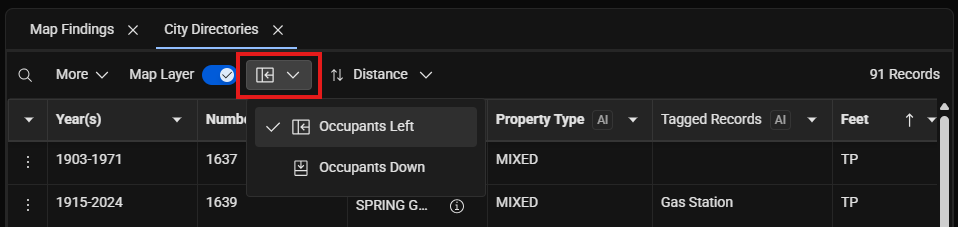
Occupants Left (Default)
The Occupants Left layout presents City Directory data as an address-level roll-up:
Each row represents a single address
Years, property type, and tagged records are aggregated at the address level
The year range reflects the first and last available years for that address
Property Type logic
Commercial — All tagged occupants across all years are commercial
Residential — All tagged occupants across all years are residential
Mixed — Tagged occupants include both commercial and residential uses
Tagged Records logic
Dry Cleaner — Displayed if at least one occupant is tagged as a dry cleaner
Gas Station — Displayed if at least one occupant is tagged as a gas station
An address may display both tags if applicable.
Interaction behavior
Selecting a record from either the list or the map opens the Detail Panel, which displays all available years and occupant information for that address.
Occupants Down
The Occupants Down layout is ideal for creating detailed occupant lists for export or inclusion in environmental site assessment reports.
Each row represents a single occupant for a specific year and address
Note that it is normal for the record count to be significantly higher than in Occupants Left
Interaction behavior
Selecting a row in the list opens the source image, when available
Selecting an address on the map highlights all associated occupant rows in the list
Table Sort Options
LightBox Live provides two preconfigured sort options for City Directories, available in both table layouts. Sorting options are available from the list header:
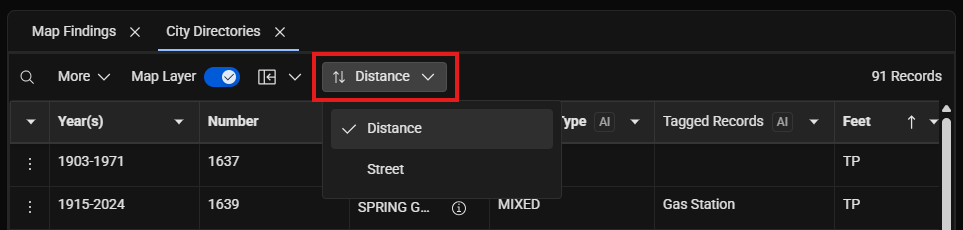
Distance (Default)
Records are sorted from closest to farthest relative to the target property. There may be instances where an address is included in a report but may not be possible to plot accurately. Addresses that cannot be plotted will appear in the table with a null distance value and no associated map icon.
Street
The street sort option allows to you to focus on one street at a time, mirroring a more traditional book review, similar to the effect of “walking up and down the street.” Sorting order:
Street name (alphabetical)
House number (ascending)
Year (newest to oldest, Occupants Down only)
Detail Panel Configuration Options
When using the Occupants Left layout, the Detail Panel can be customized to show or hide specific attributes.
Residential Filter
Hides all residential occupants in the panel
Persists while navigating between addresses
Resets when the panel or project is closed
More Menu Options
You may toggle the following attributed on or off:
Source image
Dry Cleaner tags
Gas Station Tags
Property Type
Publisher
All are visible by default, except Publisher.
Source Images
Source images are accessible directly within LightBox Live.
Occupants Left: Images are available in the Detail Panel for each year where imagery exists
Occupants Down: Images open by selecting a table row, when available
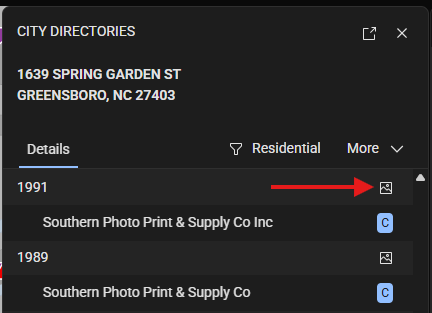
Source images may not be available when:
The source is a phone book
The source is digitally compiled (commonly post-1992)
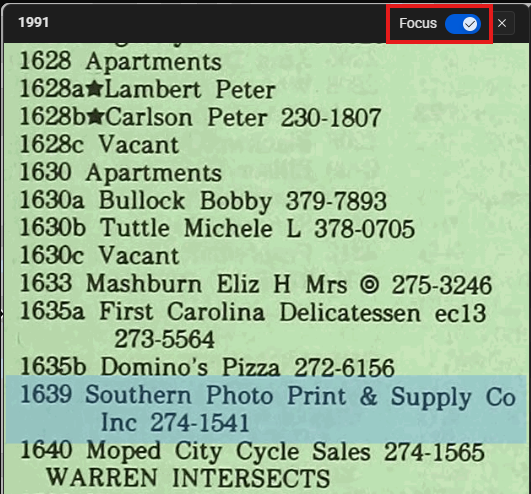
In LightBox Live, the source image displays a full page. A focus box highlights the relevant occupant entry. The focus box can be toggled on or off to improve readability.
Was this article helpful?
.png)